Saturday, April 11, 2015

Engaging Learners with Interactive Whiteboard

There are a few different companies that have these interactive whiteboards. A few are SMART, Promethean, and Mimio. No matter where the board comes from they most likely feature video, image, and lesson libraries. A good place to find resources for your board is a website called Promethean Planet. These boards have many features. You can highlight, color, hide and reveal photos or text, drag and drop, and import pictures. These boards give students a chance to participate and interact with the class using the board. They also help the teacher to keep lessons organized and interesting. It's easier to keep your students focused when they are able to come up and participate using the board. 

A cool thing that you can now get with the Interative Whiteboard is a student response system. This gives teachers the ability to give her students surveys and polls. The students will have handheld devices that they can respond to the survey or poll with. Their answers are then immediately posted up on the board. This lets students who normally wouldn't talk or answer questions have a voice in the classroom. 

This tool is very good at helping teachers to engage their students and do something interesting. With all of the hands on things this board can do students will really be able to stay engaged and focused on the lesson. The problem with the board being able to do so much is that teachers do not take the time to learn all of the features and simply use it as a projector. The board can do so many interactive things and teachers should really take the time to figure out all that can be done. Teacher training is so necessary if you want to use these boards to their full potential!

Monday, March 9, 2015

Digital Storytelling


The purpose of this website is to be a useful resource for teachers and students who want to know how digital storytelling can be integrated into their classrooms. This website was created in 2004, but is updated by the Design and Technology Program at the University of Houston College of Education. This website stresses using your own materials for your digital story, but some of theirs may still contain still images, audio files and video clips that were found on the internet. You can find some of these materials on YouTube and other free image websites. You may also get materials from TV and DVDs.


This website wants to give examples of how digital stories can be used to keep students engaged and excited about the possibility of making their own digital stories. This website gives permission to teachers and students to use any material that is found on their website. If it is used though, the appropriate attribution must also be used which is included on the site.

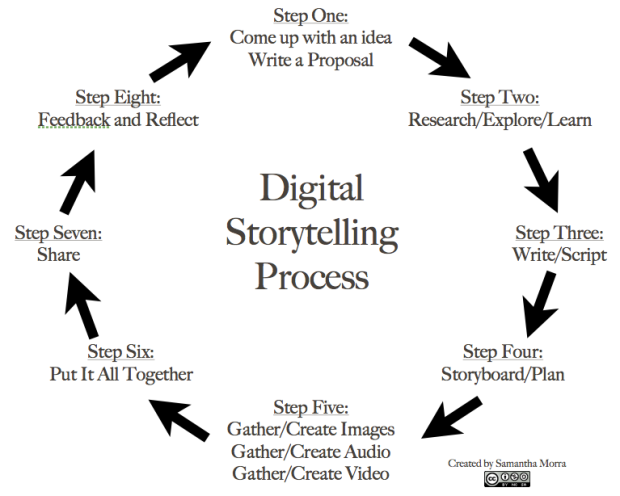
The Digital Storytelling ProcessDigital storytelling is using computer based tools to tell stories. It is combining the art of telling stories with the use of media. Most digital stories have a topic like other stories. Many digital stories unlike reading a story contain music and recorded audio narration. Digital storytelling is being used in all classrooms, from early childhood up until graduate school.


There are eight steps to digital storytelling. The image to the right will show you the eight steps. This website was very helpful for giving step by step instructions. They also have a link to an article that goes more in depth about each step.


Digital storytelling is a great way to start a lesson. A virtual field trip somewhere could be a good first part in a lesson. It gets the students excited and interested in the topic, while keeping them entertained and engaged.


Tuesday, February 17, 2015

Copyright

"Copyright is a legal device that provides the creator of a work of art or literature, or a work that conveys information or ideas, the right to control how the work is used." Copyright is to make sure that people aren't using other peoples work and claiming it as their own. Things that are public and things like words, names and other short phrases are things that cannot be copyrighted. Copyright protects many things. To name a few, you may not make copies of the work, sell the work, or distribute copies of the work. Copyright is also a thing for online and electronic publishing. If you make a copy of an online source for yourself it is most likely fair use, but if you make a copy and post it online it is probably not going to be considered fair use.

Something that you should not do is make copies of your work and use them semester after semester. You should also not make copies of your work and turn it in to different courses. Students are allowed to incorporate portions of copyrighted materials when they are doing a project, but they should not be excessive amounts of copyrighted work. If it is media there should be three minutes max. If it is text there should only be up to 10 percent of the total, or 1,000 words. There should be no more than five images from one artist or photographer.


There is now a T.E.A.C.H. Act that helps to show how copyright works in online, distance education. Before this act the U.S. copyright law applied to the classroom only involved face to face settings.


All of this information has been brought to us by the UMUC Library.


Wednesday, January 28, 2015

Teacher Critique

I choose to critique the blog Lisa Nielsen the Innovative Educator. I really enjoyed reading her about me. I like why she wrote her blog, which was because she found school boring, so she became a public school educator who works to change how people feel about school. She uses innovative ways to prepare students for relevant and real-world success. I love that she makes sure that educators and students have a voice in things that affect them. I liked that in her blog she discusses technology. One of her posts is about hashtags. Since technology is so important and so frequently used in schools today I think it's good that she discusses it on her blog. I also noticed that at the end of some of her blogs she asks questions and also gives other resources to find more information about what she was talking about. In another one of my blogs I always ended it with questions, so I like that she does that. Ending it with questions gives your readers something to think about after they read the post.


This post really stood out to me. She wrote a post about student-friendly social media guidelines. There is an innovative educator who used these guidelines to make a bulletin board. It's appealing to students and makes them want to read what it says. It's also a good way to give some reminders about social media and how what you post can affect you and the people around you.

Overall, her blog was very interesting and I think she has good ideas. I might even use some of her ideas in my own classroom to make sure my students don't start to think school is boring.


Tuesday, January 27, 2015

Introduction

My expectations for this course are to get more familiar with technology. I want to know how to use a smart board/promethean board. I would like to know how to teach lessons on it and play games. I am also hoping to get more familiar with Google drive and sites and everything that Google does. Google seems to be very convinient because everything you need is right there.


My name is Madeline Smith and I am from Knoxville. I want to be and elementary education teacher and hopefully work with one of the lower grades but would be happy anywhere. I work at an elementary school now and it happens to be the same one that I attended. It's Rocky Hill elementary in west Knoxville. I attended Pellissippi my freshman year before I came to UT, but I am very happy with my decision to come to UT. I am looking forward to this semester and the next year in the education program.


Visit my website here.